Return to Technical Evaluation
The present feature allows returning to the Technical Evaluation stage without requiring a New Round.
BPMN Flows
Two BPMN Flows were changed to allow returning to the Technical Evaluation stage.
- Process.bpmn (process)
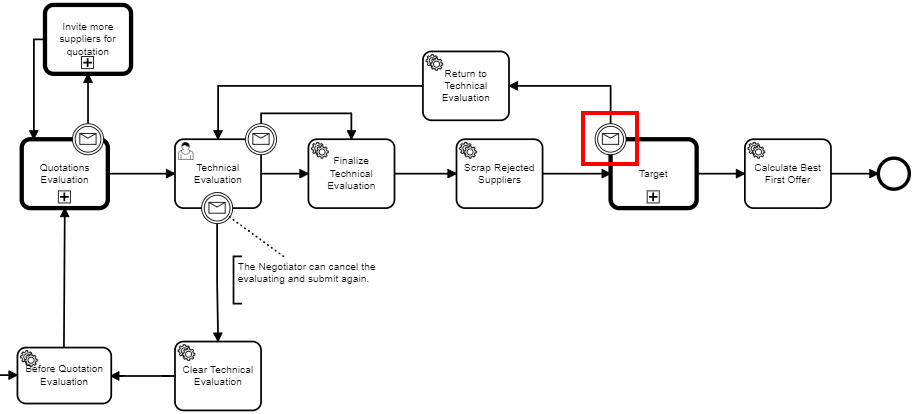
- LowValue.bpmn (process.rfq.lowvalue)
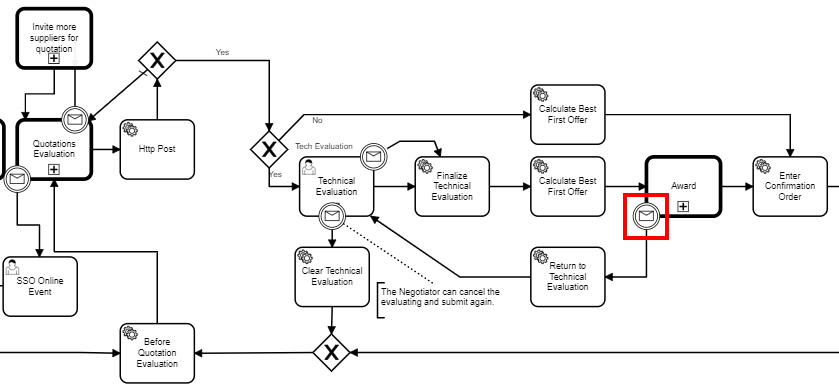
- The boundary event is triggered via the following message: msgReturnToTechnicalEvaluation
- In the Target stage for Process
- In the Award stage for LowValue
- The service task ReturnMultiTechEval has the following purposes:
- Revert the Shortlist selection sate to a previous version. This was necessary due to item rejection by evaluation, which results in disabling and blocking the Shortlist, when it was previously enabled. This was accomplished using the document versionId saved in MultiTechEvalCreateListener in BPMN variable lastQuotationEvaluationVersionId and clearing it in BeforeQuotationEvaluation so that the Shortlist state is reset but maintained between different rounds.
- Resetting the Technical Evaluation preparation
Configuration
By default this feature is disabled in CORE, since there is NO default Configuration.
To enable this feature one should configure:
- Table ProcessButton, with BPMN message msgReturnToTechnicalEvaluation
- Table ScreenFieldButton, to configure button visibility (for Target or Award)